Friday, 23 November 2012

digipak continuation

I had an array of different photographs from the video shoot that I liked, and firstly tried to create the digipak on an online template, but that wouldnt save and had to infact be copyrighted as possesion of the website, so I decided to copy a template into photoshop and work over that. All the different colours didnt mix together well so I decided to only use photographs from the beach scene.


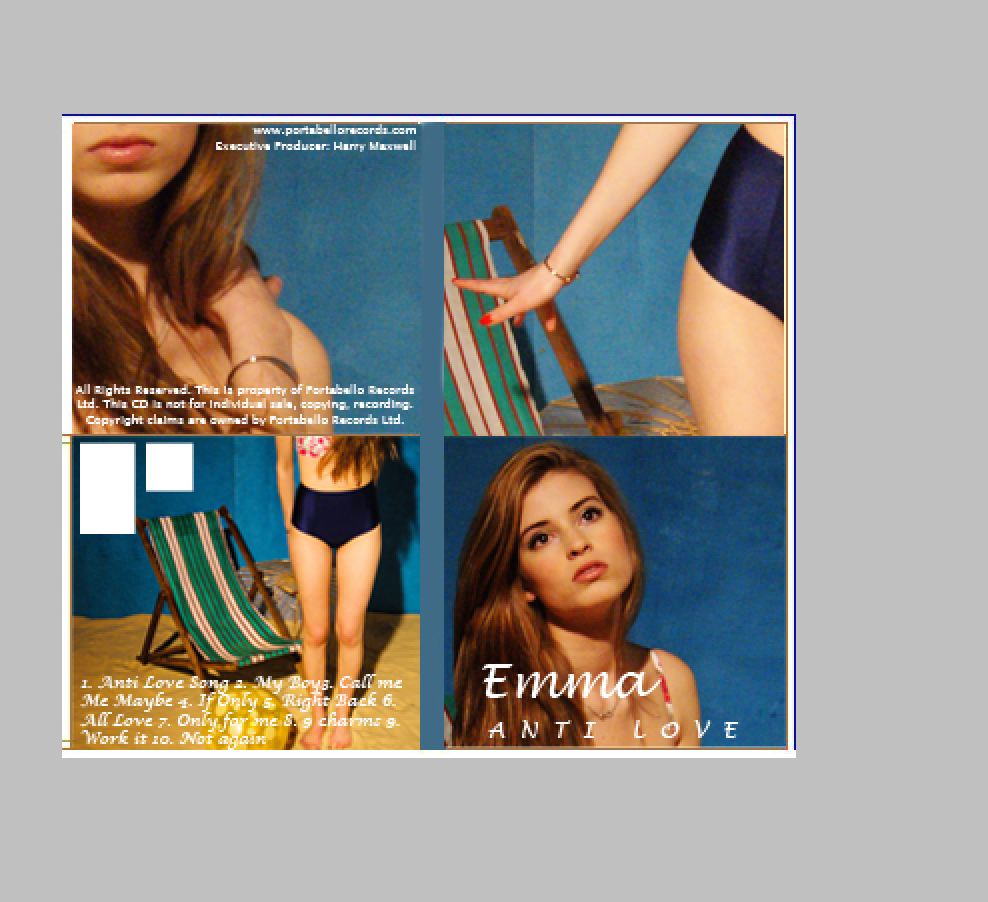
I firstly put in all the final beach photographs and saw how they looked together. All the different photos made the digipak look to ameture and it wasnt interesting enough. With the help of Phil's brain, I decided to have interesting angled shots of only sections of her in each cover of the digipak. A 4 panel digipak also worked out to be more effective. As you can see below I started to crop the photos of her in interesting and different ways. I really liked the effect that this gave the digipak as it made every page quite mysterious and insteresting, which is how we want to portray our artist.

Upon hearing feedback on the digipak prototype above the audience said the text needed to change and the front cover blue background was different to the rest. These were things I had to change. Below you can see my progression. I tried out different texts that were clearer yet still girly. I then cropped round Emmas face on the frount cover, and deleted the background. I copied a section of color from the other backgrounds and them pasted Emmas face ontop to creat the right color background.


I also tried to test whether the digipak would look better in black and white, but it turned out that we want Emma to be portrayed as fun, flirty and excited also, and the colours in the beach photographs enhanced her fun personality.
 
For my final digipak I changed the text and background colours, changed the song names and album name, and I also have to add the barcode and production logo. I looked at other digipaks like Kelly Rowland and Jo Birchall to see their production companies and the copyright details the have to put on the digipak.


continuing with digipak

 The digipak has proven to be harder than I thought. I looked through font types online as our computers didnt have the ones I was looking for. We wanted a sexy and girly font so I was looking for a curly type of writing that was girly and pretty but not too childish. I found a couple and tested them out on 'dafont.com'. I tried to insert these font onto a photograph of emma in paint but for some reason it didnt come out the way I wanted it so I decided to switch to photoshop and try and work out these issues on there.


Monday, 19 November 2012

Starting the digipak designs


In todays lesson I went up to the editing suite to get inspiration from the digipaks they keep there in order to start creating my own. Whilst I was doing this, Layla had started the editing process;


I firstly went through all the photographs I had taken of Emma purposely to use in our digipak. I also went on line and looked up the digipak template measurements so I could start cropping and sizing the images. I then took a piece of paper and drew up a diagram of a 4 panel digipak and what writing and credits had to go where. I then chose which photographs would look good together and printed them out so I could have a mini-digipak prototype. After looking at this I had to go online and see what technical credits I had to put on like 'producer' etc. Photoshop will be my main workspace to create this digipak as it allows you to move anything you want and create new designs. I also study photography and have learnt all about photoshop so I will be able to use the more complex tools and filters in order to get the best results. I thought about what other kind of songs our artist would sing about and came up with 12 titles of songs that relate to her and her genre, so the digipak is more legitimate.


Tuesday, 13 November 2012

digipak exploration

I looked online and found templates of digipaks. There were 2 templates that stuck out to me as ones I would want to use. As we want the brand of the artist to be all about her, and our music video emphasises this as she is the direct focus, I want the digipak to be the same. The digipak with have all photographs of herself. Possibly with some men in the background, but no other girls. I want to possibly include a leaflet in the front cover that you can remove from the digipak. This will include more photographs of the artist and lyrics of the songs on the album. I may also have credits to the producers and company etc.
I have taken the photographs and uploaded them onto my lightroom account and catalog. I have gone through some of them and edited the ones I liked to make them perfect for the digipak. I then exported the photos I had so far and trasported them to me hard drive, and then copied them onto my school media photoshoot account. 
I then wanted to make a mini digipak prototype and pasted the photos I could use in with the template. I will definatly take some studio shots of Emma but have to first plan what photographs will go where.

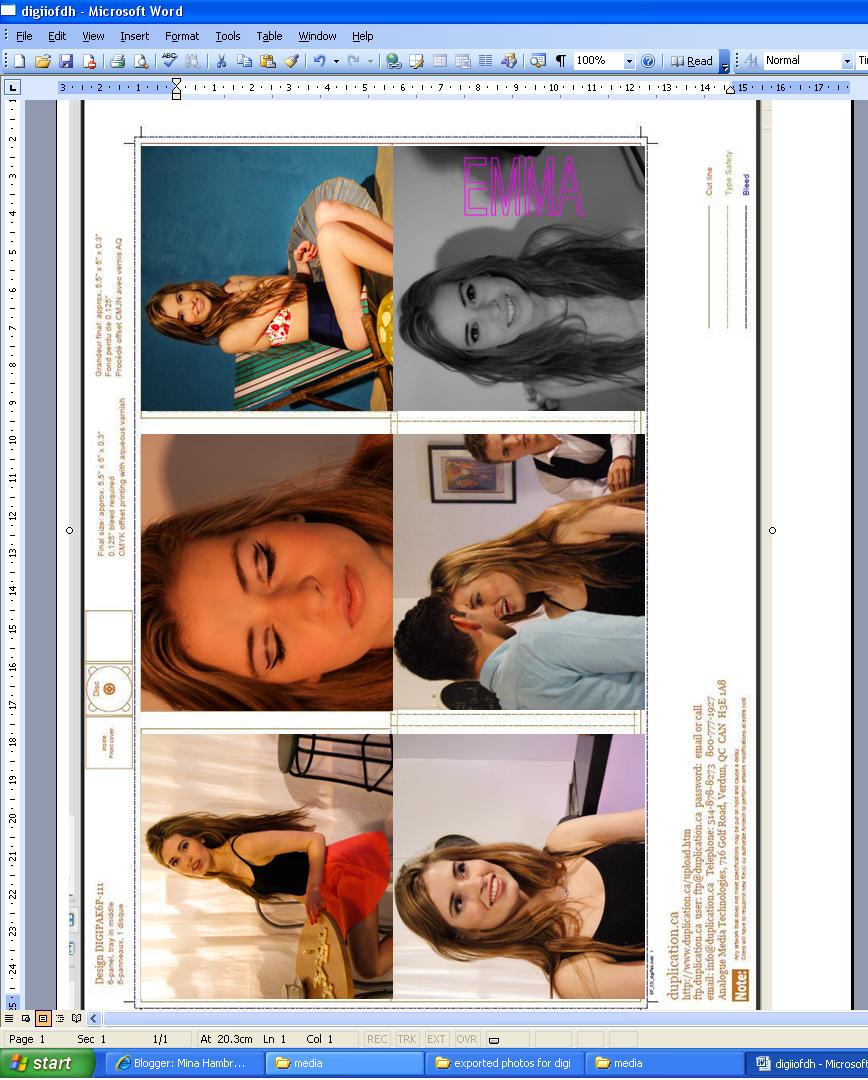
I then pasted the digipak template into word, as these computers didn't have an easy editing software and I am just making a brief template to show the group. I put the sort of photos I thought should be in each place in their sections and printed it out to make another mini pak. I quite like the look of the digipak, but it needs a lot of work. I need to think about text fonts and colour schemes of the album.

 My finished product is just underneath. There is my first template of my digipak. I will show the gorup in our next production meeting and see if they have any good advice or ideas for the digipak. I will also take in any preferences they have for the artwork or font.

Monday, 12 November 2012

Photos on set

I was not only in charge of taking continuity photographs throughout the shoot, which we needed to make sure everything was in the same place throughtout the shoot. I also was concentrating of taking stills from each shoot that we could possibly put on our merchandise, digipak and other ancillary products e.g the website. I took a lot of photographs and some of them came out very nicely. So far I am still in the middle of post editing all of them and picking the right ones. We want these photographs to be sexy and fun, giving off the right message to our target audience and we also want our star to look desirable. Here are some of the photographs I took and have edited;


Wednesday, 7 November 2012

Exploring the Digipak

We had a production meeting at the beginning of this lesson to allocate everyone roles in post production. Layla had alreay started editing our footage so we decided she should continue as she knows the most about the editing software. Sarah and Chuffy are going to start the website and I am going to design the digipak, this is useful as I was also taking stills of each set and Emma during the whole shoot, so I have material to work with. I looked into other artists digipaks and here are some of the ones I found.

                                 
I looked at Lilly allen's digipack as she relates to our artist. The both represtent the same kind of genre and we are ultimatley trying to send of the same messages to our target audience as Lily Allen does. These messages are that she is fun, flirty and appealing to everyone. Lily Allen's digipak is very colourful, which I will try and incorpoirate in ours. Colour sends out a happy vibe to audiences and it makes a digipak more welcoming and appealing.
I looked up some other digipaks just to get a better knologe of the layout so I could fully understand what I was making. I need to make and album cover, a backing cover, and 3 inside layers that show song lists and titles. I also need to think of a logo for the artist, and what her artist name will be. When I talk to the group about the artist name, we will have to think about album name and the type of font and layout we are imagining.